NEXUS IC Screen
The NEXUS IC interface consists of several key components designed to support efficient navigation and task execution.
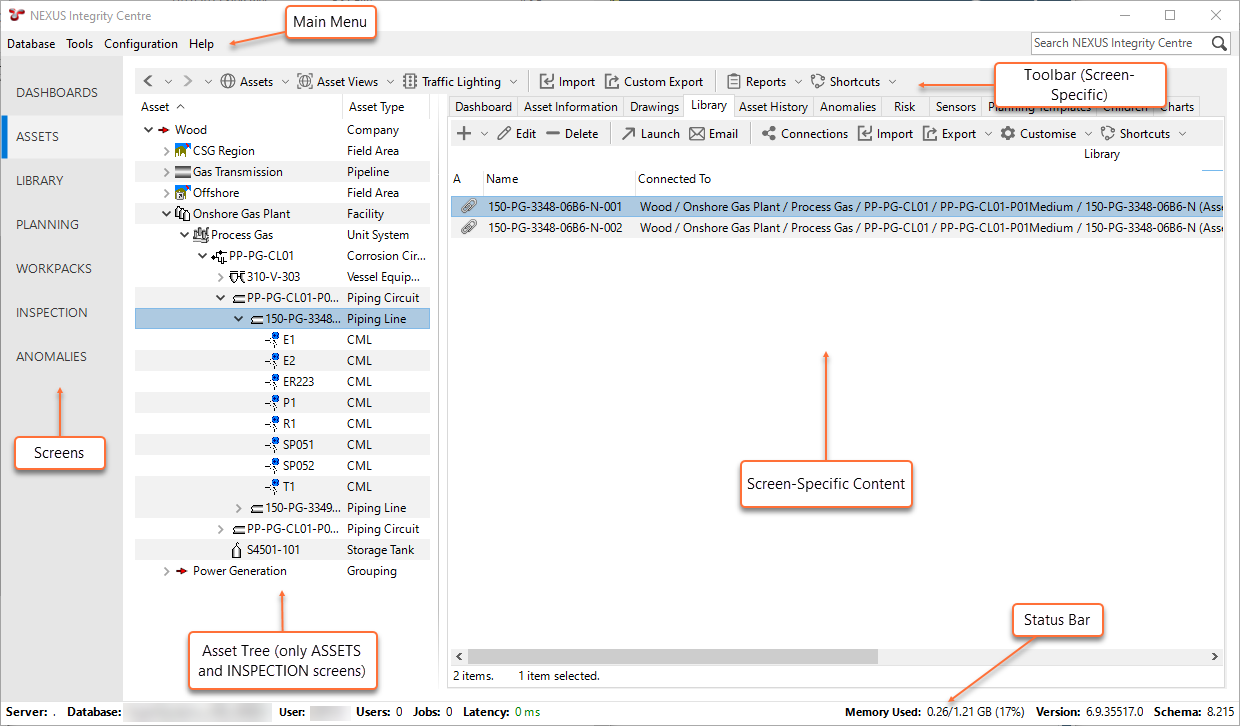
Main Screens
The sidebar allows access to various functional screens within NEXUS IC, each supporting specific asset integration management tasks.
The following main screens are available:
Screen |
Description |
Screen Description |
|---|---|---|
DASHBOARDS |
Displays the output from any report template that you have configured in the report template library and marked as a Dashboard. For more information, see Dashboards. |
|
ASSETS |
Allows you to access the asset tree where you can view and manage all the asset information stored in the NEXUS IC database. For more information, see Asset Data Management. |
|
LIBRARY |
Allows you to manage library items. Library items are electronic documents that can be linked to data and data types in NEXUS IC. For more information, see Library. |
|
PLANNING |
Shows tasks against their asset, in calendar form. You can maintain tasks, planning templates, risks or shutdowns from this screen. For more information, see Planning and Workpacks. |
|
WORKPACKS |
Allows you to maintain workpacks, which are collections of tasks or events. For more information, see Workpacks. |
|
INSPECTION |
You can upload, analyse, chart and review inspection event data from this screen. For more information, see Inspection. |
|
ANOMALIES |
You can maintain anomalies from this screen. Anomalies are records that identify discrete items or areas of concern. For more information, see Anomaly Management. |
Note
Certain screens and tabs on the NEXUS IC interface may be hidden if the user lacks the necessary permissions for the underlying tables. For more information, see Permission Requirements for User Interface Elements.
Asset Tree
The asset tree appears on the ASSETS, PLANNING, and INSPECTION screens of NEXUS IC and may be visible in various dialogs. Traffic lights can be enabled in the asset tree to display preconfigured traffic lighting values for the asset nodes within the tree. For more information, see Asset Tree.
Status Bar
The status bar, located at the bottom of the NEXUS IC interface, displays key system and session information including the connected database server and name, number of users and active jobs, connection latency, memory usage, software version, and database schema number. For more information, see Using the Status Bar.