Workpack Connector
Overview
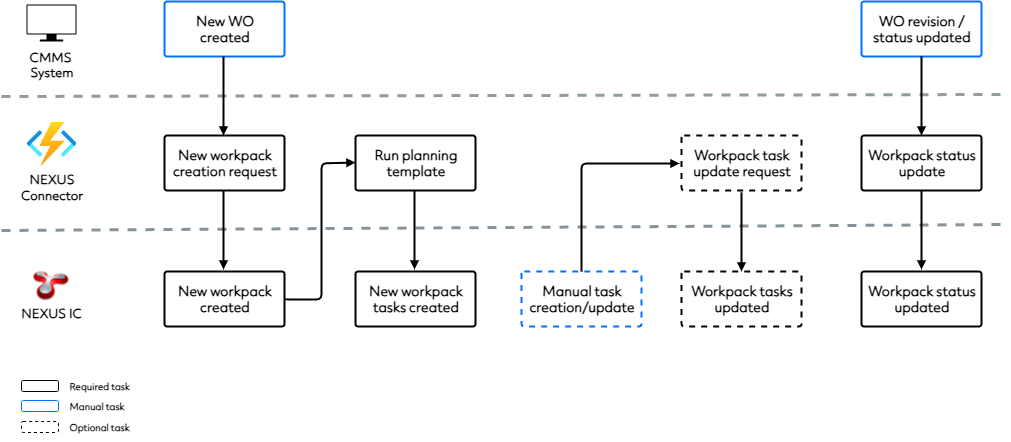
The Workpack Connector ensures that when work orders are released from a Computerised Maintenance Management System (CMMS), a corresponding workpack is automatically created in NEXUS, along with the required tasks. If a work order is later updated in the CMMS (for example, revision status changes), the associated workpack in NEXUS is also updated accordingly.
This integration removes the need for manual data entry in NEXUS and ensures that work orders in the CMMS remain aligned with their corresponding workpacks in NEXUS.
Note
The functionality described below reflects the standard behaviour of the connector. However, workflows and features can be highly customised to meet specific client requirements.
Prerequisites
Before the connector can operate, the following conditions must be met:
At least one planning template (see Planning Templates) exists in NEXUS, which can be used to generate tasks in a workpack based on the asset types of the relevant assets.
The CMMS asset location has a unique corresponding asset location in NEXUS.
The CMMS asset has a Start Date specified.
Functionality
When a work order is generated in a CMMS system, work order data is sent to NEXUS, including the planning template reference, asset locations and work order number. Additional fields - such as target dates, scheduled dates, and final dates - can also be mapped as required during configuration. This data may be stored in an Asset Information Group (AIG) form in NEXUS.
The Workpack Connector then:
Generates the workpacks based on the incoming workpack creation request.
Triggers the associated planning template, which:
Identifies child assets under the parent asset associated with the work order.
Generates tasks based on the asset types and other AIG configuration.
Users may also manually create and modify workpack tasks in NEXUS. If this occurs, the connector can re-process the original workpack creation request and add, update or remove any tasks accordingly.
Note
Task assignment for workpacks is primarily controlled by NEXUS through planning templates and rule sets defined in AIGs, not by the connector itself.
If the work order is later updated in the CMMS, the connector ensures that the corresponding workpack in NEXUS is updated to reflect those changes.
The following diagram summarises the standard workflow:
Note
An additional NEXUS-to-CMMS connection can be configured to notify the CMMS when inspection-related tasks have been completed in NEXUS. This can be configured as required as an additional connection point.