Configure Connections
Connections define the external tables that NEXUS IC communicates with and the mappings between external fields and NEXUS IC fields.
Before configuring connections, you must first configure one or more providers. For more information, see Configure Providers.
Connection Types
Connection Type |
Description |
|---|---|
Push |
Changes made in NEXUS IC are sent to the external data source, but changes made in the external data source are not propagated back to NEXUS IC. |
Pull |
Changes made in the external data source are retrieved and applied to NEXUS IC. |
Push & Pull |
Changes made in either NEXUS IC or the external data source are synchronised in both directions. |
Manage Connections
You configure connections on the Connections screen (), which is divided into two main sections:
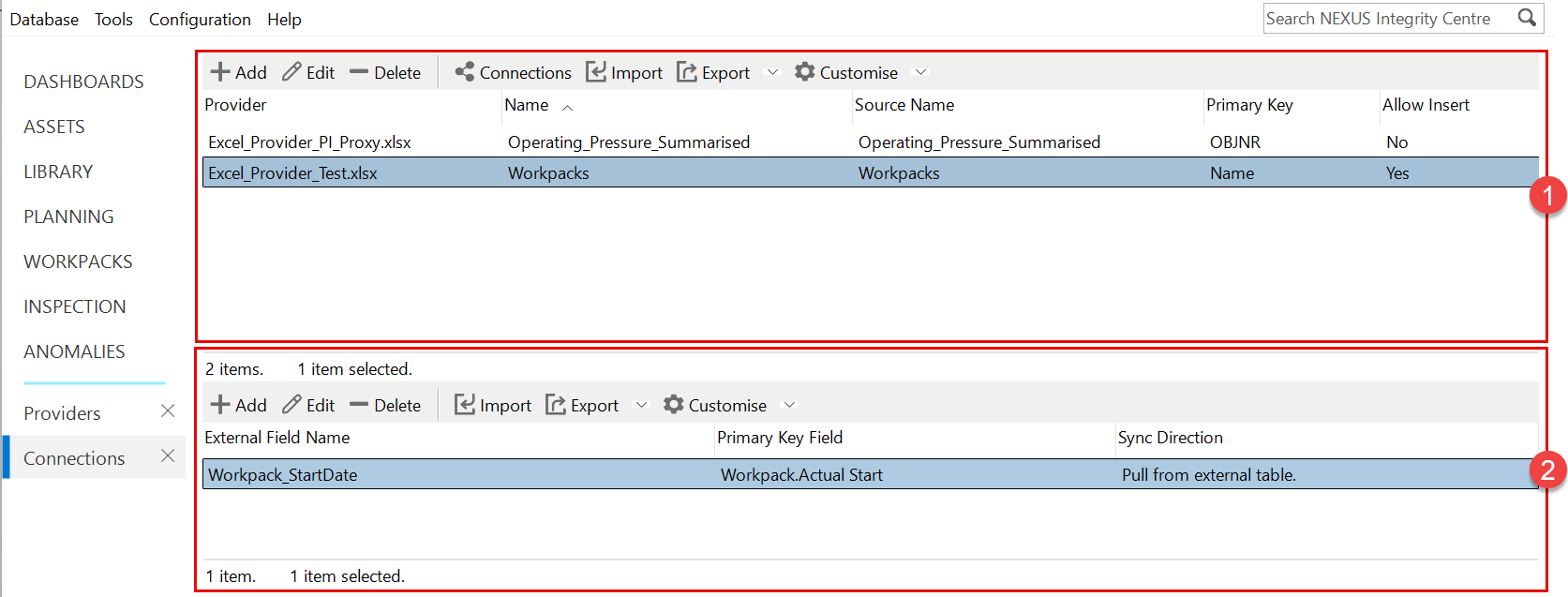
 External Table Configuration
Use the standard grid toolbar (see Using the Grid) in the upper section of the screen to create and manage external table connections.
You can configure the external table name, source table, primary key and synchronisation options.
 External Field Mapping Configuration
Use the standard grid toolbar (see Using the Grid) in the lower section of the screen to create and manage mappings between external fields and NEXUS IC fields.
Field mappings define which fields are synchronised and the direction in which data is transferred.
The two sections are typically used in sequence: first configure the external table connection and then configure the field mappings.
For step-by-step instructions, see Configure External Tables and Configure Field Mappings.
Configure External Tables
To configure an external table:
Open the Connections screen ().
In the upper section of the screen, click Add.
In the External Table dialog, click the ellipsis (
 ) button and select the provider configured previously.
Enter a name for the connection (for example,
Workpack).Specify the Source Name.
The source name is the name of the external database table or, for Excel, the name of the Excel table.
After selecting a provider and saving the record, available source names can be selected from a drop-down list when editing the connection.
Specify the Primary Key.
This is the unique field in the external table used to identify records during synchronisation with NEXUS IC. The values in the selected field must be unique.
Select or clear Allow Insert.
This option determines whether new records can be inserted into the external table or the NEXUS IC table during synchronisation.
Configure Field Mappings
To configure a field mapping:
Open the Connections screen ().
In the lower section of the screen, click Add.
In the Add External Field Map dialog, click the ellipsis (
) button and select the external table configured previously.Specify the External Field Name.
This is the name of the column in the external database table or Excel table.
Specify the Primary Key Field.
This is the NEXUS IC field used to match records with the primary key in the external table.
Select the required Sync Direction.
The synchronisation direction determines whether data is pushed, pulled or synchronised in both directions.
Click the Internal Field ellipsis button and select the NEXUS IC field to be mapped to the external field.